


Biblia Católica Español
4.640.00 Reviews
App Specs
- Version
- 1.34
- Updated On
- License
- Free
- Downloads
- 500,000+
- Developer
- maria magdalena
- Categories
- Libraries & Demo
- Platform
- Android
Screenshots
 Analysis by AppCompare
I tend to judge a Bible app less by how many options it advertises and more by whether it makes a reading habit easier to keep. Biblia Católica Español is aimed at people who want a Catholic Bible in Spanish close at hand, whether that means reading a passage quietly or looking something up while talking with family. Its focus is specific, which is useful if that is the text you want, but less compelling if you are looking for several translations or a broader study library.
It is a free reading app in the Libraries & Demo area, developed by maria magdalena. It has a 4.6 average from around 830 ratings, and more than 100,000 installs, so it has found a substantial audience without needing a complicated pitch. It is rated for everyone, and the listed release date is July 11, 2022. Those details help set expectations, but they do not by themselves tell me how an app handles personal information. I would treat trust as a question of what I can verify and what I choose to do inside the app, not as something a rating can settle.
A focused reading tool, not a general research library
The app’s central appeal is straightforward: it gives Spanish-speaking Catholic readers a practical way to open scripture on a phone. That can be more useful than a general religious-content app when I already know I want the Catholic Bible and do not want to sort through unrelated material. For someone who reads in Spanish at home, attends a Spanish-language service, or wants a familiar text available away from a bookshelf, the narrow focus is a strength.
There is a trade-off. Readers who regularly compare Catholic and Protestant canons, consult several Spanish translations, or use scholarly notes as part of study may be better served by a dedicated study Bible or a multi-translation tool. I would not choose this app as a replacement for a print Bible with annotations or a research resource; I would use it as a convenient reading companion. That distinction matters especially when preparing a lesson or checking wording carefully: a quick passage lookup is not the same thing as a full study workflow.
What I would check before making it part of a routine
The app is at version 1.34 and runs on Android 6.0 or later. Before relying on it every day, I would open a few books I know well and check that the text and navigation suit my reading habits. A useful first test is to locate a passage by book and chapter, then try the search route for a phrase you remember only approximately. If the app’s way of presenting results feels clear to you, that small check will tell you more than browsing a feature list.
For a trust-conscious reader, I would also review the permissions shown by the phone’s operating system and the app’s available privacy information before sharing anything or making it a regular part of a device. Permissions can change with app versions and operating systems, so I would make that check on the device where I install it rather than rely on assumptions. If a permission prompt appears, pause and ask whether it makes sense for the action you just chose. A Bible reader should not need blind trust to be useful; I prefer to make a deliberate choice about what I allow.
Sharing and personal boundaries
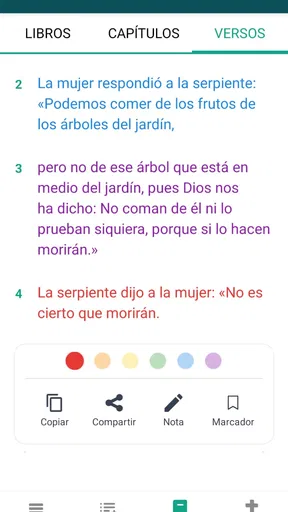
Sharing a verse can be a welcome shortcut when a friend asks what a passage says, but it also moves content beyond the app and into another service. I would treat that as a conscious action: check the selected text, confirm the recipient, and remember that the destination platform has its own account and privacy settings. If I am reading something personal or simply do not want to broadcast my activity, I can keep the passage within my own reading instead of using a share option.
Worth Reading Before You Choose

EA SPORTS FC Mobile 26 Is a Bigger Football Game, but It Takes Time

Flipboard Shows What News Apps Must Do Beyond the Feed

Switching to Android Auto Means Rethinking Your Driving Routine

Google Calendar Makes a Crowded Week Easier to Manage

Ludo King Makes the Most of the Minutes Between Plans

Baby Panda World Brings Quick Play to Modern Phones, but Its Game Library Feels Busy
That is a practical form of user agency, not a claim that the app provides a particular privacy control. I would look for visible settings and choices in the installed version, use only the ones I understand, and avoid entering sensitive details unless the app clearly calls for them. The same habit applies to notifications: if a daily prompt helps establish a routine, it may be welcome; if it becomes noise, I would check the device’s notification controls and adjust what I can there.
Reading in the rhythms of an ordinary day
A realistic use for me would be opening a passage during a quiet moment before work, then returning to it later when a conversation raises a question. On a commute, I would choose reading or listening according to the setting rather than assume audio is suitable everywhere; headphones matter around other people, and a screen is easier when I need to check a reference quickly. At home, a larger font or a darker display can make a longer session more comfortable, while a short lookup is better served by direct navigation than by browsing aimlessly.
One useful habit is to begin with a concrete question instead of trying to explore everything at once: find a chapter for a reading group, revisit a verse mentioned in a homily, or read a short section with a family member. Then decide whether the app’s presentation helps you stay with the text. That approach makes it easier to tell whether a mobile Bible is genuinely supporting your practice or merely adding another screen to your day.
Who is likely to appreciate it—and who may prefer another option
I would recommend giving it a try if you want a free, Spanish-language Catholic Bible that is convenient for everyday reading and quick reference. It is particularly suited to readers who value having the text on a phone and are comfortable with a focused app rather than a large catalogue of translations and study aids. Its Everyone age rating also makes the intended audience broad, though families should still decide for themselves how children use a phone and what content they read.
I would look elsewhere if my main need were comparing translations side by side, building extensive notes, or consulting a highly structured academic resource. I would also avoid making it the only copy of a passage I need for an important service or class until I had checked the text and learned how reliably I could reach it. For those situations, a printed edition or a specialist reference tool may be a better fit. The useful question is not whether one format is universally superior, but which one supports the task in front of you.
Practical ways to get more from a small screen
For a first session, I would try three different routes: browse to a familiar book, search for a phrase, and open a passage someone else has mentioned. This reveals whether the app works well for both planned reading and spontaneous questions. If search gives several plausible matches, use the surrounding chapter to confirm you have the intended passage rather than copying the first result automatically. That is a small but important safeguard when a remembered phrase is incomplete or common.
I would also treat audio as a different mode of reading, not simply a hands-free version of the same task. Listening can fit a walk or household chore, but it is harder to scan backward, compare wording, or pause at a specific sentence without losing your place. For reflection or careful study, I would keep the text visible; for familiar material during a routine activity, audio may be more convenient. Choosing the mode to suit the task is more useful than trying to use every option on every occasion.
Likewise, reading adjustments are most helpful when set for the situation. A comfortable font and background can reduce strain during a longer session, but a high-contrast or dark display that works at night may not be ideal in bright daylight. I would make a quick adjustment when the environment changes rather than assume one setup will feel right everywhere. These small decisions can make mobile reading less tiring without turning customization into a project.
Questions worth settling in your own first session
Will it work for a reader who is not fluent in Spanish? The app’s scripture is in Spanish, so it is best for someone comfortable reading that language or for a learner who specifically wants Spanish practice. It is not the choice I would make for a person who needs an English text alongside Spanish for every passage. A bilingual or multi-version resource would be more practical for that use.
Can it replace a paper Bible? For carrying a text, finding a passage, or reading in spare moments, it may be enough. For writing in margins, comparing pages at a glance, or reading without a phone nearby, print still has clear advantages. I see the app as a portable counterpart, not an automatic substitute. Keeping both formats available can be sensible if a reader uses scripture in different settings.
Is it suitable for group discussion? It can help participants reach a passage quickly, especially when everyone is comfortable with the same Spanish text. Before a group depends on it, I would agree on how references will be called out and verify the wording together. If the discussion depends on several editions or detailed notes, a more specialized resource will save time and avoid confusion.
Does a free app make sharing or permissions inconsequential? No. Free describes the price, not the handling of information or the behavior of external services used for sharing. I would still check the controls available on my device, consider what I send to another app, and keep private reading private when that is my preference. That is a reasonable routine for any app, especially one used as part of a personal practice.
Using the app with clear expectations
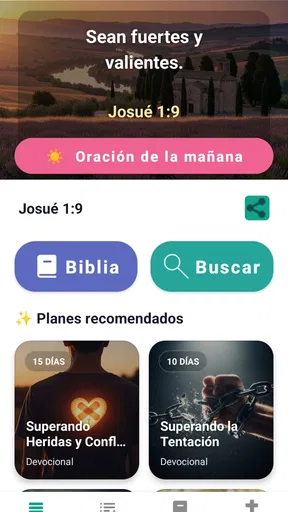
Installing the Biblia Católica Español app is a breeze. Just head over to your preferred app store, search for the app, and you’re good to go. Once installed, you’re greeted with a sleek and intuitive interface. It’s like having a beautifully bound Bible right in your pocket, ready to open up whenever inspiration strikes.
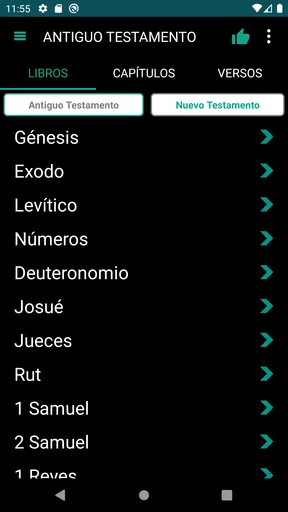
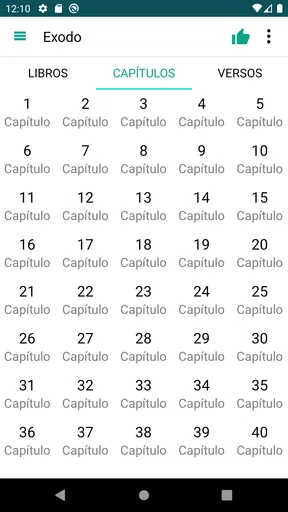
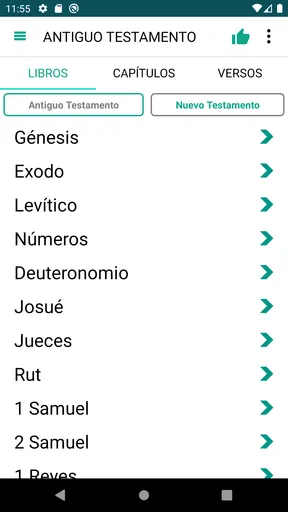
What really stands out is the app’s user-friendly design. The developers have clearly put a lot of thought into making navigation seamless. You can easily jump from Genesis to Revelation with just a few taps. If you’re anything like me, you’ll appreciate how quickly you can find specific chapters or verses without having to flip through endless pages.
Features that Elevate Your Experience
One of the highlights of this app is its extensive list of features that cater to both casual readers and avid Bible scholars. For starters, it includes a powerful search function. Whether you’re looking for a specific passage or a keyword, the app delivers results in the blink of an eye. It's perfect for when you need to find that one verse that’s just on the tip of your tongue.
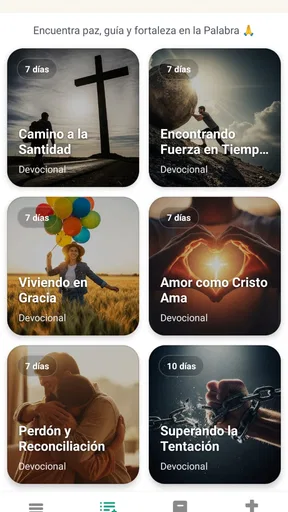
The app also offers daily verses and devotionals, which are fantastic for keeping your spiritual journey on track. Imagine waking up to a new verse every morning that sets a positive tone for your day. It’s a small touch, but one that can have a big impact.
For those who enjoy sharing insights or discussing scripture with friends, the app’s sharing feature is a game changer. You can easily share verses or passages via social media or messaging apps, allowing you to spread the word with just a few taps.
Customization and Accessibility
Customization is key with the Biblia Católica Español app. You can adjust the font size, switch between day and night modes, and even change the background color to suit your reading preferences. These options make reading comfortable, whether you’re enjoying a sunny day at the park or cuddled up at home in the evening.
Another great feature is the audio function. If you prefer listening to the Bible, this app has you covered. The high-quality audio makes it easy to absorb the scriptures while commuting or during a workout. It’s like having a personal narrator guiding you through the sacred texts.
A measured recommendation
Overall, the Biblia Católica Español app is a fantastic tool for anyone looking to deepen their understanding of the Bible in Spanish. Its user-friendly design, robust features, and customization options make it a standout choice for both beginners and seasoned readers.
Whether you’re using it for personal study, preparing for a sermon, or simply seeking inspiration, this app makes accessing the Bible easier and more enjoyable than ever before. So why not give it a try? It might just change the way you engage with the sacred texts.
Ready to dive into the scriptures? Download the app today and start your spiritual journey with the Biblia Católica Español.
Pros
- User-friendly interface
- easy to navigate.
- Offline access to read anytime.
- Comprehensive search function.
- Daily verses for inspiration.
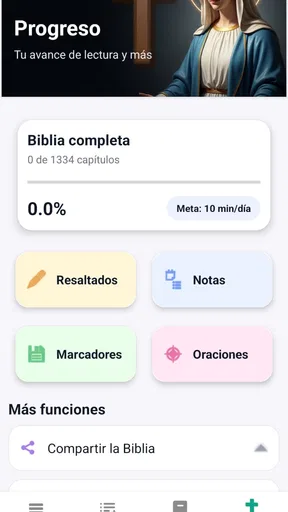
- Bookmark and note-taking features.
Cons
- Ads can be intrusive at times.
- Limited customization options.
- Initial load time can be slow.
- No audio version available.
- Occasional translation inaccuracies.
FAQs for Biblia Católica Español
What features does Biblia Católica Español offer?
Biblia Católica Español provides a comprehensive digital Bible experience in Spanish. It includes features such as daily readings, audio Bible options, and various translations for deeper understanding. Users can bookmark verses, highlight important scriptures, and make notes, enhancing their study and reflection. Additionally, the app provides offline access, making it convenient for users on the go.
Is Biblia Católica Español available offline?
Yes, Biblia Católica Español allows users to download content for offline access. This feature is particularly useful for those who wish to read or listen to scriptures without an internet connection, ensuring that users can engage with their faith anytime and anywhere, whether commuting or traveling.
Are there any in-app purchases in Biblia Católica Español?
While Biblia Católica Español is free to download, it may offer in-app purchases for additional features or premium content. These could include access to special commentaries, devotional plans, or ad-free experiences. It’s advisable to review the app’s purchase section to understand what enhancements are available.
How user-friendly is the Biblia Católica Español interface?
Biblia Católica Español is designed with a user-friendly interface, making navigation intuitive for users of all ages. The app organizes its features logically, allowing easy access to various Bible sections, bookmarks, and notes. The search function is efficient, helping users quickly find specific verses or topics of interest.
Can I customize my reading experience in Biblia Católica Español?
Yes, Biblia Católica Español offers customization options to enhance the reading experience. Users can adjust font size and style for better readability, choose from different themes to suit their preferences, and switch between day and night modes. These features ensure a comfortable and personalized experience for every user.


